

Get It Right Once: Meeting FADGI Image Quality Without Risking Fragile Records
11 min read
60-Second Summary
Since June 30, 2024, federal agencies have been required to manage permanent records electronically for transfer to the National Archives and Records Administration (NARA). Agencies digitizing permanent paper records using reflective digitization techniques must follow the standards in 36 CFR 1236 Subpart E. Once the digitized version passes validation, it becomes the permanent record, and the agency may dispose of the paper under an approved records schedule.
That sequence gives most fragile originals one realistic chance at capture. This paper covers four topics:
- What the regulation requires, including the FADGI category that applies to each record type
- How the quality-control and validation rules turn a single image failure into another handling pass on the original
- Four principles for capturing a compliant image on the first pass while protecting the source record
- How the Leon County Supervisor of Elections in Florida is digitizing voter registration records that date to the early 1900s
It closes with questions to ask of any digitization workflow, whether you run it in-house or through a service provider.
The One-Shot Problem
Agencies still hold large backlogs of permanent paper records, and each record must be digitized to Subpart E before NARA will accept it.
The validated file carries the legal and research weight the paper once held. Under section 1236.56, the agency can then dispose of the source record, unless it decides to keep it for reasons such as litigation holds or rights issues. Section 1236.56(g) adds a condition that raises the stakes: an agency cannot use a General Records Schedule to dispose of source records if the digitized versions do not meet the subpart. A noncompliant file leaves the agency storing paper it planned to retire, with no compliant record to transfer.
Capture has to serve two parties at once. The original is often brittle and irreplaceable, and every pass through a scanner puts it at risk. The file it produces feeds optical character recognition (OCR), full-text search, automated classification, redaction, and a growing number of artificial intelligence (AI) tools. A capture program has to protect the physical object and produce an image good enough for every system that will read it.
What the Regulation Requires
FADGI is the Framework; Subpart E is the Rule
The Federal Agencies Digital Guidelines Initiative (FADGI) publishes technical guidelines for digitizing federal and cultural heritage collections. The guidelines define materials categories and star levels, each with measurable aim points and tolerances. FADGI is guidance.
36 CFR 1236 Subpart E is the binding authority. Section 1236.50 builds its performance parameters on FADGI three-star aim points and tolerance ranges. FADGI, in turn, aligns its imaging metrics with the international standard ISO 19264-1.
Agencies often write “FADGI 3-star” into requirements as shorthand. The regulation is more specific, and it assigns a different FADGI category to each type of paper record.
| Record type | Examples | FADGI category under 36 CFR 1236.50 | Minimum resolution |
|---|---|---|---|
| Modern textual records | Typed or printed office records on paper | Documents (Unbound): Modern Textual Records | 300 ppi (Table 1) |
| Other paper records | Manuscripts, illustrations, graphics, carbon copies, Thermofax, documents with poor legibility | FADGI three-star, Documents (Unbound): General Collections | 300 ppi (Table 1, with adjusted target evaluation) |
| Fine detail and photographic records | Photographic prints, graphic-arts prints, drawings, embossed seals | FADGI three-star, Prints and Photographs | 400 ppi (Table 2) |
Source: 36 CFR 1236.50(d) and (e). Table 1 and Table 2 refer to the performance tables in the regulation.
A typical federal backlog holds more than one of these types, sometimes in the same box. A project planned only around the 300 ppi floor will fall short on the photographs, maps, and annotated pages mixed in with the typed correspondence.
File Formats
Section 1236.48 limits the formats for digitized paper records to TIFF 6.0 (uncompressed or Deflate), JPEG 2000 Part 1 (lossless, or visually lossless at no more than 20:1), PNG 1.2, and PDF/A. Agencies that use visually lossless JPEG 2000 must test for compression artifacts. The rule also prohibits transcoding or up sampling files anywhere in the workflow, so an image captured below the required resolution cannot be scaled up to pass.
Resolution is Necessary but Not Sufficient
Scanner specifications typically state optical resolution in dots per inch (dpi), while the regulation specifies image sampling frequency in pixels per inch (ppi). A scanner capable of 600 dpi optical resolution provides sufficient native sampling capability to support the regulation’s 300 ppi and 400 ppi requirements, provided the resulting images also meet the other required image-quality parameters.
Resolution alone does not establish compliance. Section 1236.50 also sets limits for tone response, color accuracy, noise, and other parameters, measured against reference targets. Agencies need to verify scanner output with target-based image-quality analysis, using the profiles and settings the project will run in production.
The Clause About the Original
Section 1236.50(c) requires digitizing equipment that is appropriate for the media type and capable of achieving project objectives “without damaging the source records.” Section 1236.42(d) adds a broader duty to safeguard source records against loss or damage throughout the project.
Image quality and safe handling therefore sit in the same requirement. A project that meets the image specification while tearing brittle carbon copies has not met the rule.
The project lifecycle under Subpart E
The regulation lays out a sequence. Each step either protects the original or decides whether it will go through the scanner again.
- Inventory. Before digitizing, the agency establishes intellectual control over the records: completeness, gaps, date range, restrictions, disposition schedule, and location (section 1236.42(a)).
- Project plan. Section 1236.44 requires a written plan that records the volume and condition of the records, the equipment and software, the file naming method, and a quality management plan with quality assurance and quality control components.
- Capture. Images are produced to the specifications in sections 1236.48 and 1236.50.
- Quality-control inspection. Every image file is checked to confirm it opens, uses a permitted format, and meets the resolution, color mode, bit depth, and color profile requirements. A sample then gets a visual inspection on a calibrated monitor at 100% magnification: at least 10 records or 10% of each batch, whichever is larger, or another documented, statistically valid sampling plan (section 1236.46).
- Correction. If 1% or more of the examined records fail any criterion, the agency must find the source and scope of the errors, correct or re-digitize the affected records, and reinspect until the sample set reaches a 100% success rate. Failures below 1% still require correction or re-digitization of the affected records.
- Validation. After the project, separate staff, independent of the staff who performed the quality-control inspections, confirm that scope, metadata, image attributes, legibility, and documentation all meet the subpart (section 1236.56).
- Disposition and transfer. Validated records become the permanent records. The agency transfers them to NARA with metadata in CSV format and keeps project documentation until NARA confirms receipt and the transfer of legal custody.
Steps 2 and 3 are where an agency decides how many times each original will be handled. Steps 4 and 5 are where a poor capture decision sends it back to the scanner.
How Digitization Projects Fail
An irreplaceable original can fail in two ways, and the two are linked.
Failure One: The Image
A batch that misses the 1% threshold triggers correction, re-digitization, and reinspection. For a fragile record, re-digitization means pulling it from the box again and sending it back through the capture device. Each miss adds labor and another handling event for an original that may not survive many more.
Failure Two: The Original
Aged paper tears at folds and lifts at tape lines. Brittle sheets jam feeders, and small or narrow items can fold or tear at transfer points in the paper path. Every pass through a machine is another opportunity for that damage.
How the Two Failures Compound
The failures feed each other. Each re-digitization driven by a quality miss is another handling event, and handling damage can cause the next quality miss. In the worst case, the agency damages a permanent record and still has no compliant image of it.
The records most exposed are the ones filling federal backlogs: onionskin and carbon copies, faded stamps and handwriting, folded and taped sheets, and mixed sizes in a single box. These are the materials a fixed-speed feed path handles worst, and the most likely to produce a faint image that fails inspection.
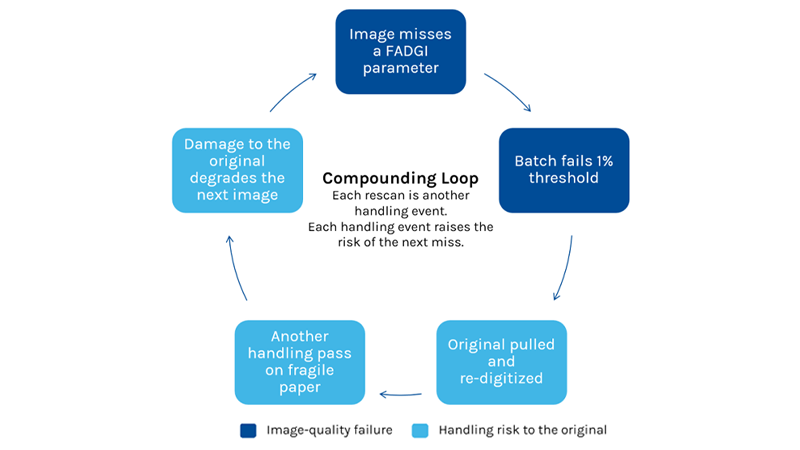
Image Quality is the Input to Everything Downstream
The FADGI parameters matter beyond the audit, because the image is the input to every system that will read the record. A shadowed fold or a washed-out crease that passes a quick human glance can become a failed character in OCR, a missed entity in extraction, or a wrong automated classification.
No one can know everything a future researcher or AI agent will need to pull from a record. If the paper has been disposed of, the image is all that remains. Capturing below the bar caps the record’s value for good, and the cost appears years later, when recognition tools fail on it.
Four Principles for Getting it Right Once
The goal is a compliant image on the first pass, with the original touched as few times as possible. These principles apply to the whole workflow, whatever equipment it uses.
1. Handle each Document as few Times as Possible
Every step between the box and the validated image is a handling event: removing fasteners, sorting, inserting separator sheets, feeding, re-feeding, and reassembling. A capture process that cuts preparation and runs each item once lowers labor and risk together. Count the touches per item in your project plan, and treat that number as a design target.
2. Match the Capture Method to the Condition
A sturdy modern sheet and a brittle carbon copy should not run the same way. Loose sheets in workable condition suit a sheet-fed scanner with adjustable speed and a straight paper path. The most fragile items may need hand placement, either on the same scanner or on a flatbed. Bound volumes, oversized maps, and items too fragile to move at all belong on a flatbed or overhead capture station.
Build these routes into the project plan before capture starts. Sorting by condition during inventory costs less than discovering a problem mid-batch.
3. Verify Quality at Capture
Run target-based image-quality analysis at the point of capture, on the same settings the project uses in production. A failing image found while the original is still in hand costs one rescan. The same failure found after the box is reshelved means retrieving and preparing the original again before it can be rescanned.
Joe Odore put it this way at the Digital Government Institute’s October 2026 Digitization Update: “You get one clean pass when it comes to scanning heritage-based records.”
4. Keep Transfers Between Devices to a Minimum
Each time material moves to a second machine for an odd size or condition, it gets handled again and risks being separated from the rest of its file. Choose primary capture equipment that covers the range the collection actually holds, and route only the true exceptions to a secondary station.
In Practice: Leon County Supervisor of Elections
The Leon County Supervisor of Elections (SOE) in Florida serves about 190,000 registered voters. Its archives date to the early 1900s, and the office was running out of space to store them. Retrieving records was slow, and changes to Florida law now allow digital versions to replace physical records.
That combination creates stakes similar to those federal agencies face under Subpart E. Once a digital version replaces the paper, the image has to be right.
The backfile includes media from more than a century of record keeping, from thin, film-like sheets to card stock. Those materials do not run smoothly through conventional scanners. In 2023, the office installed an OPEX Falcon+® RED™ system, which pairs a Falcon+ scanner with a Model 72™ RED™ extraction desk, along with OPEX CertainScan® software.
The office has processed 209 boxes of historical voter registration records, with about 2,000 documents in each box, and has scanned 418K cards for its retention processes. The same equipment also handles petitions, returned mail, and vote-by-mail envelopes. That shared use cut staffing for petition processing by 75%.
“It’s important that we spend our tax dollars in the best way possible,” said Christopher Moore, Deputy Supervisor of Elections.
The full case study, Leon County Supervisor of Elections Overhauls Its Manual Document Processes, Saving Money for Taxpayers, is on opex.com.
How OPEX Approaches This
The four principles describe what to look for in any capture workflow. OPEX scanners are designed around the same principles, so they make a useful concrete example.
- Handle once. OPEX built its business on a One-Touch process: an operator removes staples, drops the pages, and scans, with no batching or separator sheets. Fewer touches mean less labor and, for fragile records, fewer passes.
- Match to condition. OPEX Falcon+ scanners handle a wide range of media through a straight paper path rated for 45–1,300 gsm. A roller flattens folded media, including tri-folds, and keeps small, narrow, and mixed documents under continuous control. Operators can adjust speed or place a fragile item by hand without moving to another machine.
- Verify at capture. Falcon+ and FalconV+® scanners offer optional FADGI 3-Star Capability. The scanners support resolution up to 600 dpi, with OPEX specifying 300 dpi scanning with FADGI compliance. OPEX scanners also integrate with GoldenThread, target-based image-quality analysis software that measures and reports conformance at the point of capture.
- Cover the range. One Falcon+ station handles a wide span of sizes and conditions, so collections move through fewer machines. Bound volumes and oversized items still need a flatbed or overhead station, and a good project plan routes them there from the start.
Getting it right once is an engineering goal, and agencies can write it into their procurement requirements.
Questions to Ask any Digitization Workflow
Whether the work runs in-house or through a service provider, these questions test whether a workflow will get it right once.
- Which record types does the project include, and which FADGI category and minimum resolution apply to each?
- How is conformance proven, and does the evidence come from reference targets or from a vendor claim?
- How is capture matched to brittle, taped, bound, and mixed-size material, and which items are routed to a flatbed or overhead station?
- How many times is a fragile original handled between the box and the validated image?
- Where does the quality check happen: at capture, or after the box is reshelved?
- What is the re-digitization rate, and what drives it?
- What metadata and project documentation will the workflow produce for validation and transfer?
The companion checklist, Get It Right Once, turns these questions into a working tool for project planning and vendor evaluation.
Getting it Right Once
For permanent records, the digitized file becomes the record and feeds every system downstream. The objective is a compliant image on the first pass, with the original intact. Agencies that write that objective into the project plan and the equipment requirements cut re-digitization and protect the original.
To see how your own records perform, ask OPEX to scan a sample of your agency’s most fragile material on a Falcon+ scanner, and we will review the image-quality results with you.
Other Resources You Might Find Helpful
Get It Right Once: FADGI Image Quality Without Risking Fragile Records
OPEX Perfect Pick Automated Multi-Temperature ASRS
Get It Right Once: Meeting FADGI Image Quality Without Risking Fragile Records
OPEX Axis™
Powering Data-Driven Decision Making: Transforming Scanned Data into Actionable Insight
From Paper to Insights: Extracting Actionable Data with Intelligent Scanning
Feeding the Data Warehouse: Integrating Scanned Document Data for Comprehensive Analysis
Instant Answers: Leveraging OCR for Searchable Government Records
Better Data, Better Outcomes: How Accurate Scanning Improves Government Reporting
Unlocking the Story in Your Documents: Using Metadata to Enhance Data Discoverability
NEXT LEVEL AUTOMATION
Unlock Operational Efficiency with OPEX
OPEX is powering the future of automation. Contact us to learn more about how our vertically integrated automated solutions can help take your business to new heights.